
Reminders and visit summaries on WhatsApp
👋 Notes from the development team
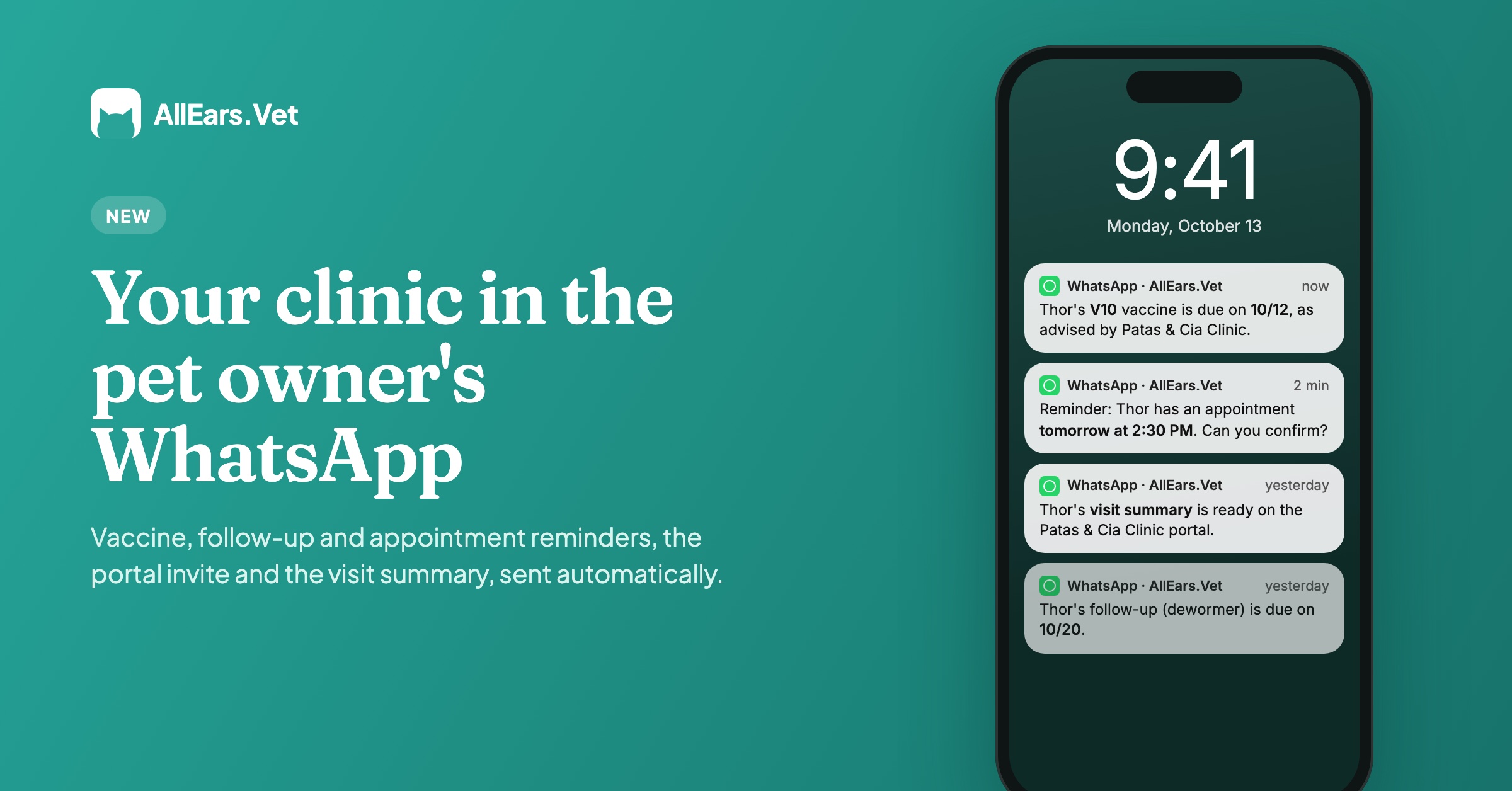
In this version, we focused on communication with guardians, something users ask for often. AllEars.Vet now sends automatic WhatsApp messages with your clinic's name in the text: vaccine, recheck and appointment reminders, the portal invite and a notice that the visit summary is ready. That summary is new too: the artificial intelligence drafts a plain-language text from the consultation, and you review it and publish it to the guardian portal. For now, WhatsApp messages are sent in Portuguese, for practices in Brazil.
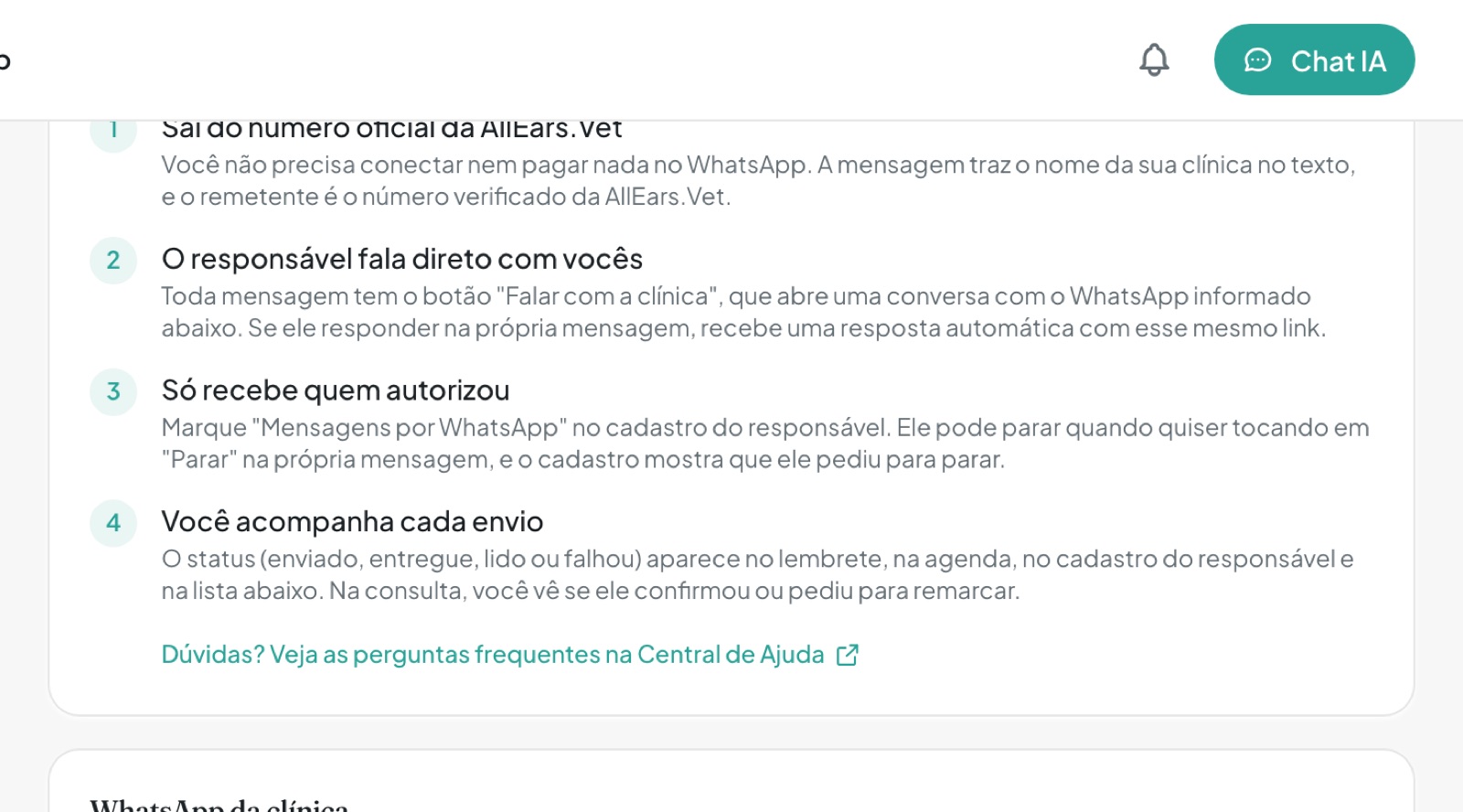
We made sure the conversation stays with you. Every message has a "Talk to the clinic" button that opens the clinic's WhatsApp, only guardians who agreed receive it, and answers to appointment reminders come back to the agenda.
We also started respecting the languages spoken in your consultations, and the professional registration now follows each vet's country. As always, the version brings a number of usability improvements and fixes, listed below.
Our aim stays the same: the most useful app for vets, with artificial intelligence put to work on real consultation tasks, at a fair price. Much of what is here came from your suggestions, so keep sending yours through Contact us.
And keep an eye on the next releases: we are building features many of you have asked for.
The AllEars.Vet team
💬 Automatic reminders on WhatsApp
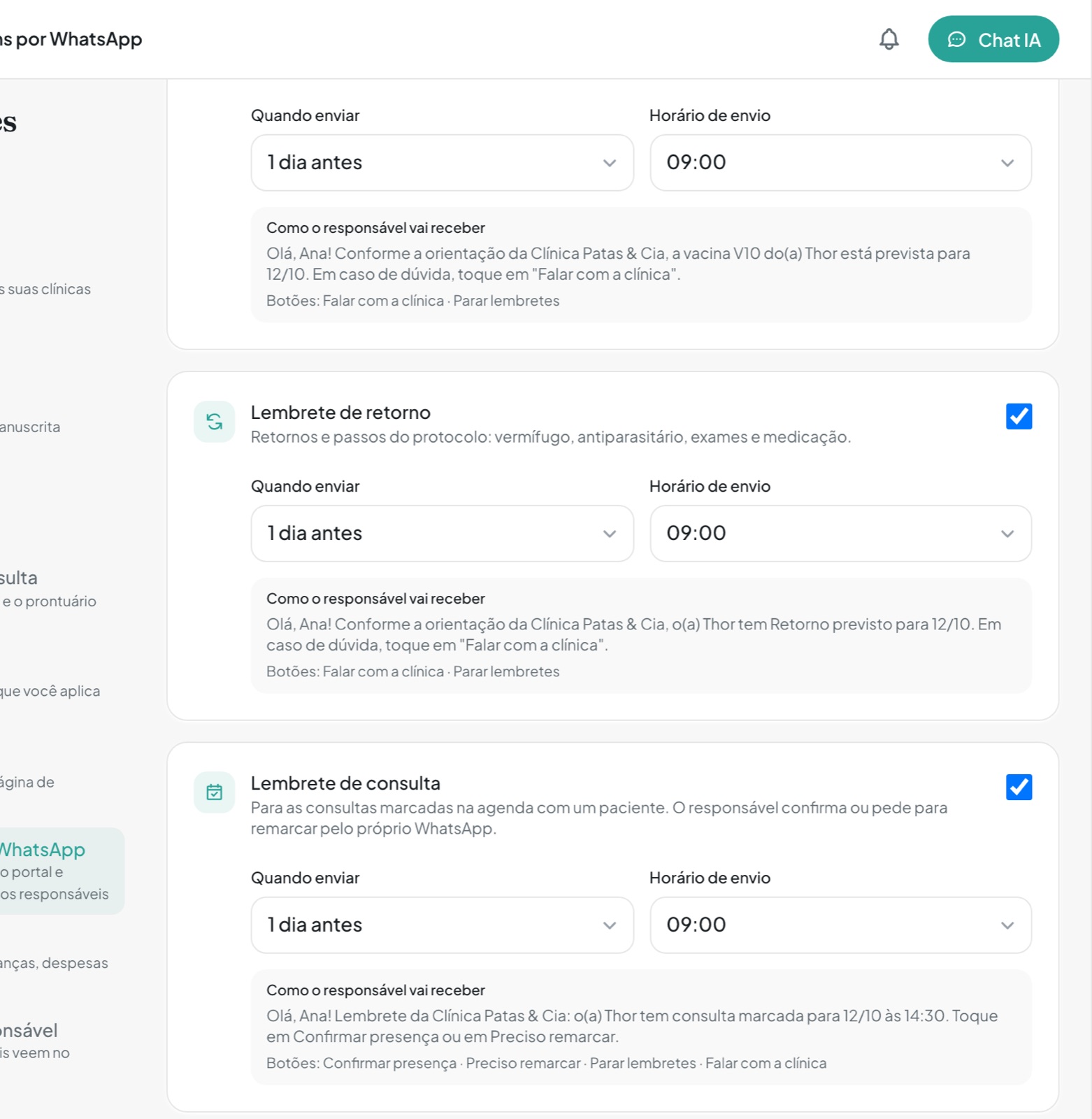
In Settings → WhatsApp messages, turn on vaccine, recheck and appointment reminders: the guardian gets the message with your clinic's name and a "Talk to the clinic" button. Available in Portuguese, for practices in Brazil.
📋 Visit summary for the guardian
The AI drafts a plain-language summary, you review it and publish it to the portal.
🎙️ Transcripts in your consultations' languages
In Settings → Language, tick the languages spoken in your consultations: each line is transcribed in the language it was said, and the summary and medical record come out in the app's language.
📋 Professional registration that follows your country
CRMV and state in Brazil, the SENACSA register in Paraguay and a professional licence elsewhere, printed correctly on prescriptions and documents.
🐾 Patient photo right on the record
Tap the photo at the top of the record to view, change or remove it, without opening the patient form.
What changed in this version
New features
- Automatic WhatsApp messages to guardians, in Settings → WhatsApp messages (in Portuguese, for practices in Brazil): choose which types to use (vaccine, recheck and appointment reminders, portal invite and visit summary), when reminders go out (on the day or 1 day before) and at what time. Messages come from the official AllEars.Vet number, with your clinic's name in the text and a "Talk to the clinic" button that opens your WhatsApp.
- On the guardian's record, "WhatsApp messages" records their consent. They can stop anytime by tapping "Stop" in the message, and the record shows it.
- Each message's status (queued, sent, delivered, read or failed) shows on the reminder, the agenda, the guardian's record and the month's list of messages.
- On appointment reminders, "Confirm" and "Reschedule" answers show on the agenda event.
- Summary for the guardian, on the consultation's Summary tab: the AI drafts a plain-language text, you edit it, publish it to the portal and can announce it on WhatsApp with a short note.
- On the guardian's Access tab, the Send button sends the portal invite on WhatsApp, with the same access link that already exists.
- Consultation languages, in Settings → Language: tick every language spoken in your consultations and the transcript keeps each line in the language it was said, while the summary and medical record stay in the app's language.
- The professional registration follows the vet's country: CRMV and state in Brazil, the SENACSA register in Paraguay and a professional licence in other countries, printed correctly on prescriptions and documents.
- In Brazil, the official SNCR numbering for controlled-drug prescriptions is available to every vet. Numbers are requested from the web version, in Settings → Signatures, with a gov.br login, and apply to prescriptions signed on any device.
- Tap the patient's photo at the top of the record to view, change or remove the profile photo. With no photo, one tap opens the picker.
- When Mima cannot solve a problem, she shows a card with the subject and message, and the Send ticket button sends it straight to support.
Improvements
- Digital signing in Brazil got faster and shows each step: preparing the document, checking the certificate and applying the signature.
- The Sign button always shows on a finished prescription. The dialog explains the missing method and, with no handwritten signature on file, you upload a photo of it right there and sign straight after.
- On controlled-drug and compounded prescriptions in Brazil, the guardian's CPF and address are asked for while you create the patient, and a guardian missing them is completed on the same screen.
- When you add a photo to the patient's history, "What is this photo for?" makes clear whether it stays in the history only or becomes the profile photo.
- Summaries and medical records stick more closely to what was said in the consultation.
- A support request is sent at once, never kept as a draft.
Fixes
- Photos taken with your phone are no longer rejected when saving the patient, and when a photo cannot be used the app says why.
- The summary and medical record come out in the app's language even when the consultation was spoken in another language.
- The medical record no longer shows up as a code block or with AI comments before the text.
- The text editor no longer freezes when you press Enter over a selection or accept a keyboard suggestion on Android.
- On iPhone, tapping Share twice no longer freezes the app.
- Digital signing with certificates from some certificate authorities no longer fails when one of the verification servers answers empty.
- The SNCR numbering sends the CRMV in the federal council's format.
- When reviewing a consultation, the AI no longer offers to create a guardian who is already linked, even when it heard only the first name.
- Patients imported from another system and content generated by the AI always stay in the clinic where they were created.
- A summary the AI returned in an invalid format is now redone automatically instead of showing up empty.
- What you approve in a conversation with Mima always runs in the workspace (personal or clinic) where it was asked.
- The consultation's charge suggestion shows up even after the consultation was moved to another workspace.
- When you switch the Google calendar used for syncing, no event is left behind in the old calendar when Google is slow to answer.