
Finance: the charge starts from the consultation
👋 Notes from the development team
In this version, we focused on launching Finance, so that billing for an appointment lives in the same place as the medical record. The charge starts from the consultation itself: when the summary is ready, AI suggests the items with the prices from your price list, and you confirm it, take payment by Pix, cash or card and keep track of what is still due. In a clinic, each person only sees what their role allows.
For now, Finance does not issue tax invoices and is not integrated with card machines. Both integrations are already being studied for future versions.
We also adapted the app for people who work in the clinic without recording consultations, such as reception, who now open straight onto the calendar, charges and records. And you now choose, file by file, what the pet parent sees in the portal.
As always, the version brings a number of usability improvements and fixes, listed below.
Our purpose has not changed: to build the best app for vets, with artificial intelligence that is easy to use and does real work in the appointment, at a fair price. Several changes in this version, such as grouping the photos of a report into a single exam, came from user requests, so keep sending yours through Contact us.
And keep an eye on the next releases: we are building features many of you have asked for.
The AllEars.Vet team
💰 Finance: the charge starts from the consultation
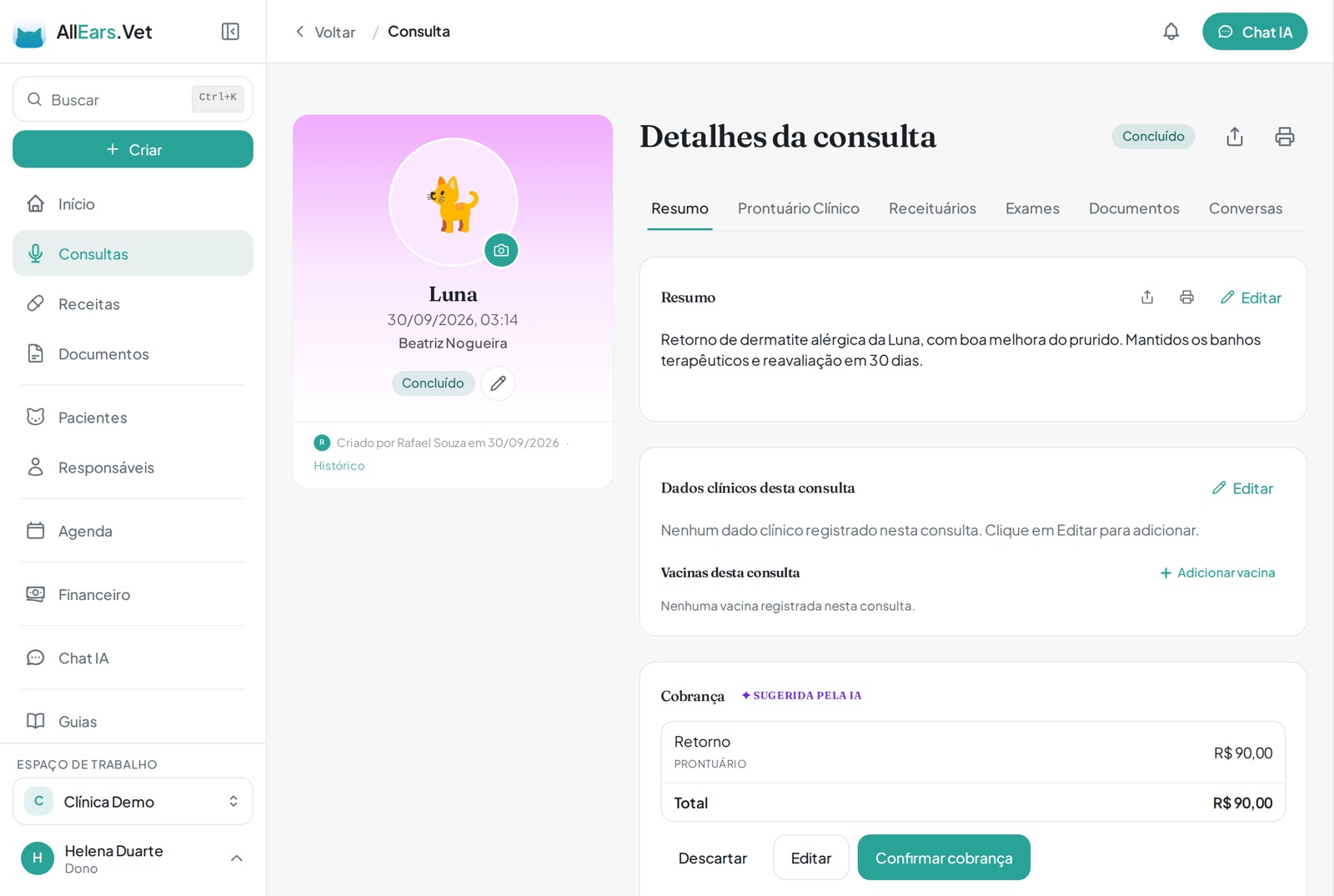
When the summary is ready, AI suggests the charge with the items and prices from your price list. Check it, confirm it and take payment by Pix, cash or card.
When the consultation ends, the "Charge" card carries the AI suggestion with the item and price from your price list, and where it came from. Confirm, edit or discard it.
💬 Charge on WhatsApp with a Pix copy-and-paste code
One tap builds the message with the amount due and a Pix code generated by the app itself, with no middleman and no fee.
📊 Expenses, cash forecast and monthly result
Record the bills you have to pay and see how much should be left over in the coming weeks, what came in and went out month by month, and your practice's margin.
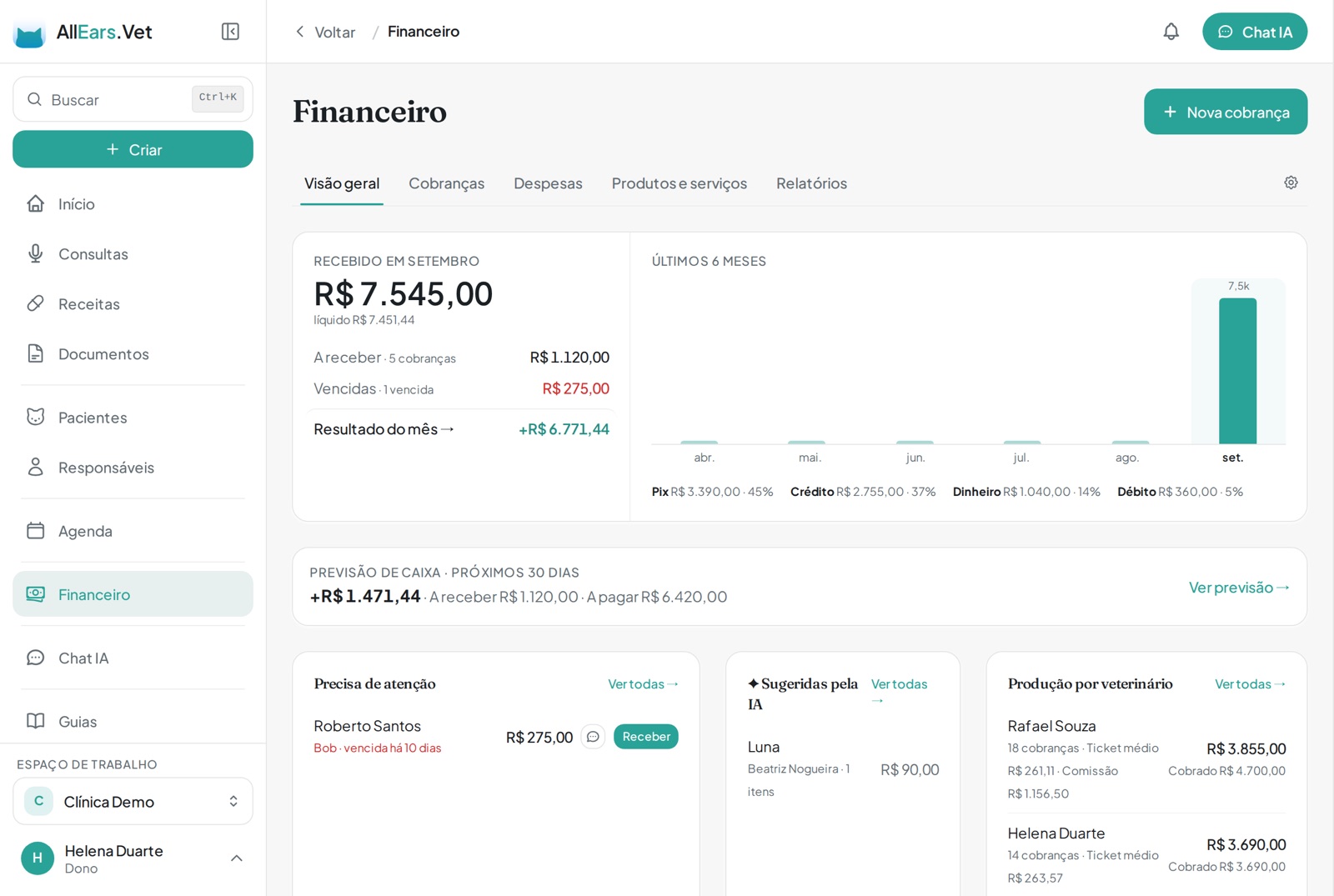
The overview shows what came in this month, what is still due, by payment method, and each vet's production.
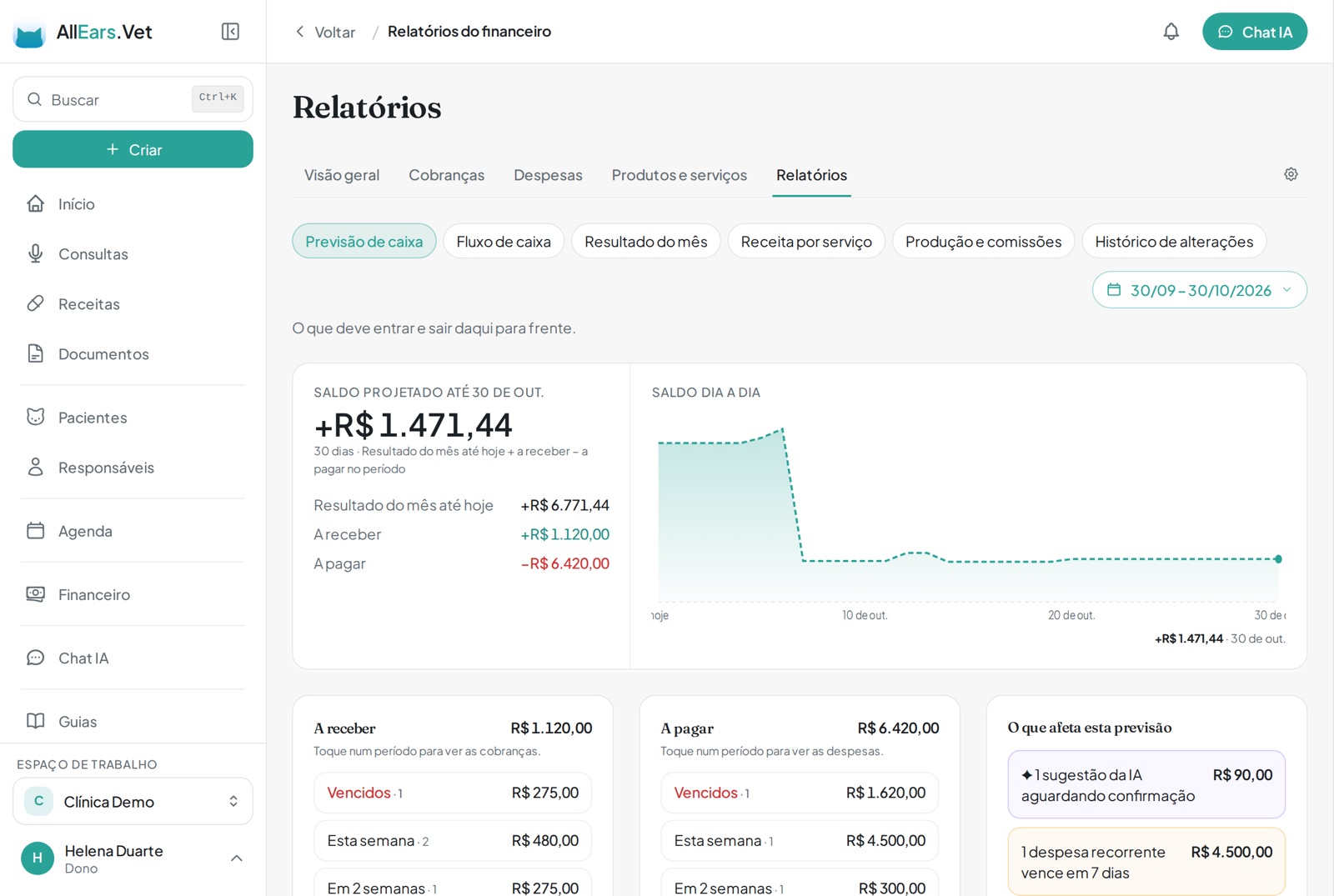
Under Reports, the cash forecast adds the month's result, what is due in and what is due out, and shows the balance day by day.
🏥 For clinics: access levels, commissions and the daily till
Decide who sees amounts and who takes payment, set each vet's commission and close each operator's till with a count.
🐾 Exams with several photos
The pages of a report or the frames of an ultrasound become a single exam, with a caption on each photo. Mima reads them all.
📤 You decide what the pet parent sees
Every document and exam has a "Visible to the pet parent" option. A chat screenshot stays in the medical record unless you release it.
📋 The app adapts to each role in the clinic
People who do not record consultations, such as reception, open straight onto the calendar, charges and records, with the first steps for their own job.
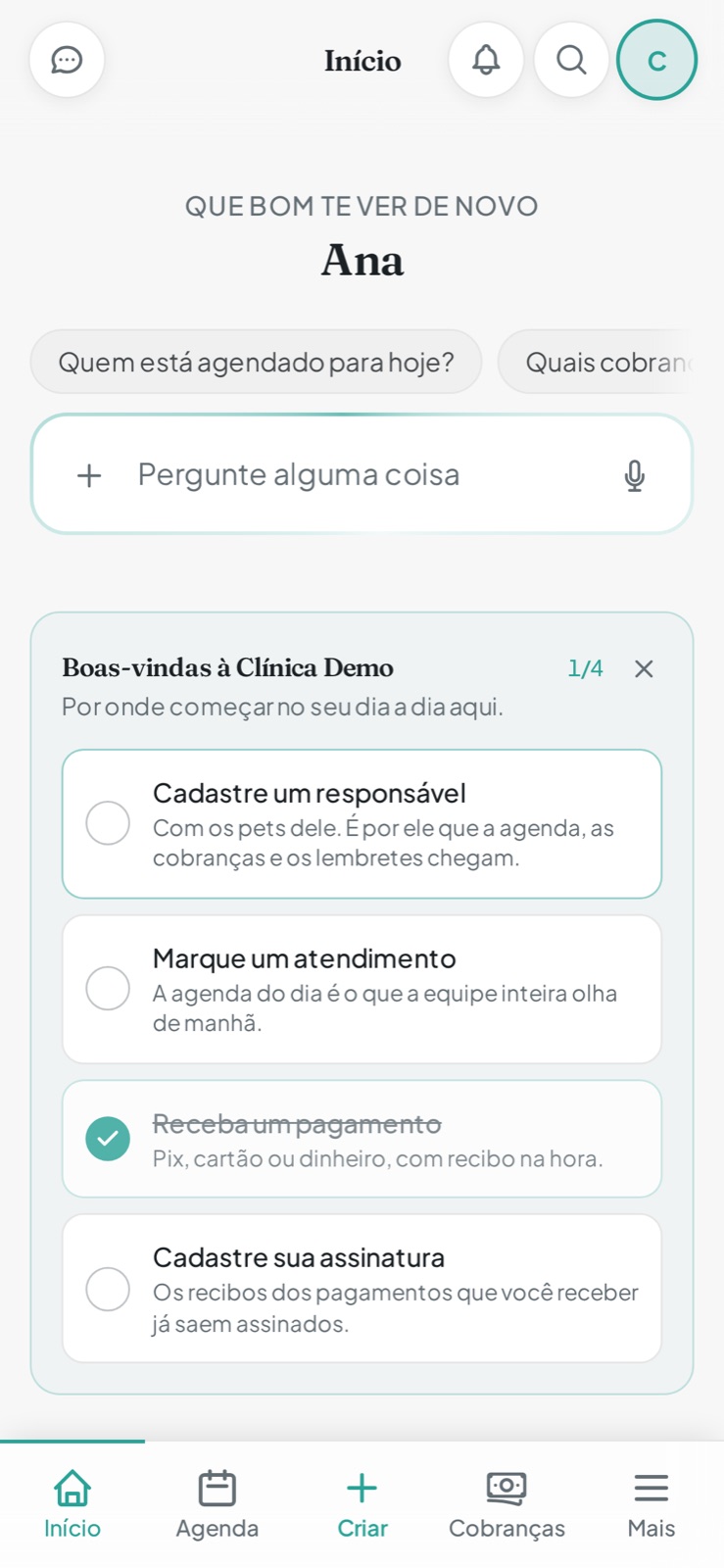
The receptionist opens onto Calendar and Charges in the menu, ready-made questions for Mima and the first steps for her own job.
What changed in this version
New features
- Finance: charges, payments (Pix, cash, card and bank transfer) and the products and services list, with a charge suggested by AI at the end of every recorded consultation.
- Charge on WhatsApp, with a Pix copy-and-paste code generated by the app itself.
- Pet parent prepayments: the amount settles open charges by itself, and whatever is left stays as credit for the next ones.
- Quotes with an expiry date, which become charges when approved and keep the reason when they are not.
- Service packages sold in advance (five baths, three sessions), with sessions deducted on each use.
- Optional stock control per product, deducted automatically when the charge is confirmed.
- Take payment for several charges from the same pet parent at once.
- Card receivables, one line per instalment, to check what the card operator deposited.
- Expenses with due dates and weekly, monthly or yearly repeats, plus reminders of bills coming due.
- Finance reports: cash forecast, cash flow, monthly result (cash or accrual basis), revenue by service and production per vet, with spreadsheet export for your accountant.
- A PDF receipt for each payment, with your handwritten signature when you have one set up.
- Finance change history: who changed what, when, and the value before and after.
- For clinics: finance access level per person and per role, discount limits, configurable commissions and a daily till with a count.
- For vets who work in other people's clinics: partner clinics, each with its own split rule.
- Mima answers finance questions ("who owes us?", "how much did I take in August?") and also creates charges, records payments and builds the payment request message, always asking for your approval first.
- If you want, the pet parent sees open charges in the portal and pays by Pix.
- If you already use another system, you can switch Finance off, and nothing is deleted.
- Exams with several photos (up to 10) and a caption on each, with thumbnails in the history and full-size photos on tap.
- Several images together, such as the screenshots of a chat, become a single document, one page per image (up to 10).
- A "Date and time" field when attaching a file, so something attached later shows up on the right date in the history.
- A "Visible to the pet parent" option on every document and exam, with a badge in the patient history showing what the portal displays.
- Received documents (consent forms, colleagues' prescriptions, referrals) can show up in the portal and be sent to the pet parent.
- The clinic invitation screen shows the role and everything the person will be able to do, and new team members get a welcome card with the first steps for their job.
Improvements
- Menus, shortcuts and the home screen adapt to each person's role in the clinic, including roles the clinic creates.
- On phones, settings are gathered under More → Settings, and the More screen is better organised.
- The handwritten signature can also go on payment receipts, including for people without a vet licence number, such as reception.
- Someone invited to a clinic joins the team straight after confirming their e-mail, without going through the sign-up questions.
- Connecting AllEars.Vet to ChatGPT is simpler: a button in Settings → Integrations opens its page in ChatGPT, and you just tap Connect.
- The prescription QR page has a "Validate signature at ITI" button, so the pharmacy can check the signature with the government validator.
- When you share your booking page link, the message shows a preview with your name and photo, or the clinic logo.
Fixes
- Digital signatures made up to 29/09 were rejected by the ITI validator because of a fault on our side. It is fixed, and anyone affected sees a notice to renew them all at once with the certificate password; the content, QR code and validation code stay the same.
- Certificates and consent forms no longer show a stray comma before the date when the clinic has no city on file.
- Your photo shows up again on the booking page.
- When you ask Mima to correct a prescription it has just created in the conversation, it adjusts that same prescription instead of creating another.
- Mima no longer wrongly adds the "nothing was created" notice under answers that only looked data up.
- Very long consultations whose audio was recovered later are transcribed normally again.
- On Android, recording stops at the 2-hour limit even with the app in the background.