You finish the appointment, the record is ready in AllEars.Vet — and then a question comes up: what if you could simply talk to all that history? Ask what was left pending at a patient's last follow-up, compare two consultations, or have your own Claude or ChatGPT cross-reference your cases — without copying and pasting a single line.
That's what two AI features in AllEars.Vet deliver: the MCP server, which connects your account to the AI tools you already use, and Mima's context-aware chat, which understands which patient or consultation you're asking about and fetches the right data before it answers.
MCP server: connect your Claude or ChatGPT to your data
MCP (Model Context Protocol) is the open standard that lets AI assistants securely reach external tools and data. AllEars.Vet exposes its own MCP server — and connecting takes less than a minute.
Under Settings → Integrations you'll find the server address. Just paste it into Claude Desktop or ChatGPT as a custom connector, authorize via OAuth in your browser (you approve each client, while logged in), and you're done. From there, the AI you already use can see — with your permission — your patients, owners, consultations, records, and prescriptions.
What you can do in plain language, straight from your assistant:
- List and open patients and owners, with breed, species, and history
- Walk through consultations and records — "summarize Thor's last three follow-ups"
- Look up and generate prescriptions from what's on file
- Follow each patient's timeline, event by event
Everything stays scoped to your account: the server only returns data that's yours. And you stay in control: there's a "Allow AI to edit and delete data" switch. On (the default), the AI can edit a record or prescription at your request; off, it stays in read-and-create mode only, without touching what already exists. Under Active connections, you can see every authorized client and revoke access instantly.
Mima's chat: context that understands your clinic
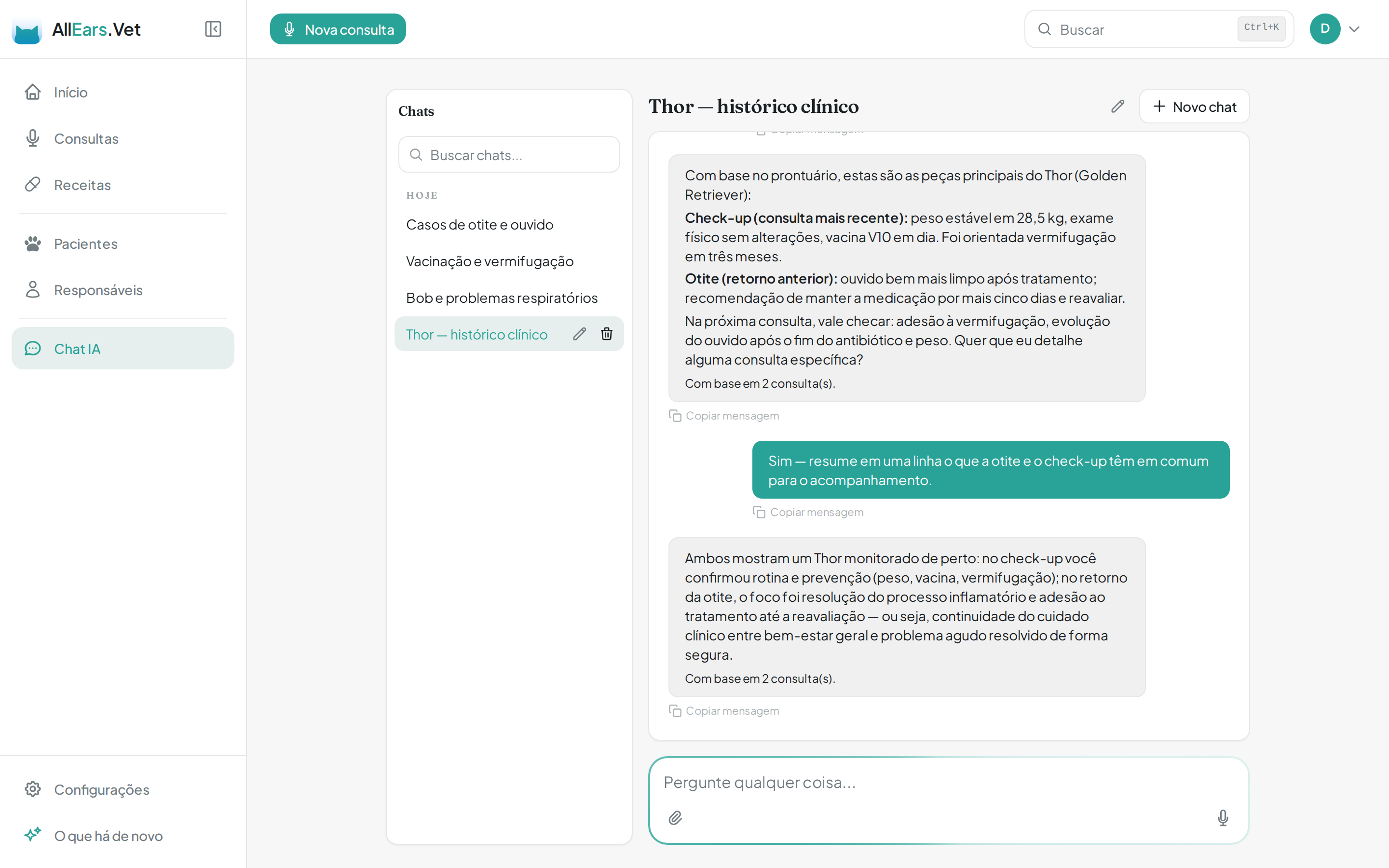
Inside the app, AI Chat is where Mima lives. The difference from a generic chatbot is easy to feel in practice: she has context.
When you ask something, Mima first understands the intent — whether it's a general clinical question, about a specific patient, about a consultation, about clinic numbers, or about how to use the app itself — and loads only the context needed. Instead of guessing, she pulls the real record, often from more than one consultation, and shows how many consultations she drew on to answer.
In practice:
- "What did we note about Max's breathing?" → she opens the patient's last consultation and answers from what's on file.
- "Summarize Thor's history: check-up, ear infection, and vaccines. What should I bring next time?" → she cross-references different consultations and returns an overview, citing the sources.
- Attach an exam and ask about it — Mima reads the file alongside the patient's history.
- App questions — ask how to record a consultation or where to edit a clinic, and she points to the right screen.
- Ask for a file — a PDF, a spreadsheet (CSV), or a report of your consultations, generated on the spot.
It's the kind of answer that only makes sense because the AI knows your history — not a generic model, but your clinical routine, with your patients and the clinical signs you recorded.
Private by default
Both features were built on the same principle: every operation is scoped to the authenticated user — you only see and change your own records. The external connection goes through OAuth, is listed transparently, and can be revoked whenever you want. And edit-and-delete control is always in your hands. As with any AI, it's worth double-checking important information before acting.
Documenting is no longer the end of the story. With the MCP server and context-aware chat, all the history you already record in AllEars.Vet becomes something you simply talk to — from inside the app or from the AI you already have open.

