

For years, signing a veterinary prescription meant pen, paper and a stamp. Today a prescription can be created, signed and verified entirely in the digital world — with the same legal weight as a handwritten signature, and often with more security. But the topic comes wrapped in acronyms: ICP-Brasil, e-CPF, A1, A3, cloud certificate. This guide sorts it all out: how digital signatures work, what types exist, where to get a trustworthy certificate, and how to set it up in AllEars.Vet to sign your prescriptions in seconds.
What a digital signature actually is
A digital signature is not a picture of your handwriting pasted into the PDF. It is a cryptographic process: the document is "sealed" with a private key that only you hold, producing a unique mathematical mark for that exact file. Anyone can verify two things, without depending on you:
- Authorship — who signed (your name and CPF are bound to the document).
- Integrity — whether the content changed after signing. Altering a single comma invalidates the seal.
In Brazil, the infrastructure that gives this public legal standing is ICP-Brasil (the Brazilian Public Key Infrastructure), created by MP 2.200-2/2001. A signature made with an ICP-Brasil certificate is a qualified signature — the highest level, legally equivalent to a handwritten one. That is exactly the type the Federal Council of Veterinary Medicine requires for electronic prescriptions.
Qualified vs. advanced: the difference that matters
There is an intermediate level, the advanced signature — for example, signing via gov.br. It works for many everyday documents, but it is not equivalent to a handwritten signature for every purpose.
In veterinary practice this is decisive: for controlled-substance prescriptions (special control, controlled compounded formulas), the law requires a qualified signature with an ICP-Brasil certificate. The gov.br advanced signature is not enough. That is why an ICP-Brasil certificate is the one worth having — it covers everything from a simple prescription to a controlled one.
The certificate types: A1, A3 and cloud
Every ICP-Brasil certificate identifies either you as an individual (the e-CPF) or the company (the e-CNPJ). For signing prescriptions, what matters is the e-CPF — it states "this veterinarian, registered under this CPF, signed it." What changes between types is where the key is stored:
| Type | Where it lives | Typical validity | In short |
|---|---|---|---|
| A1 | .pfx/.p12 file on the computer |
1 year | Practical for signing in software; can be uploaded and stored encrypted |
| A3 | USB token or smartcard | up to 3 years | The key never leaves the physical device — more portable, less automatable |
| Cloud | Secure server, used via app/phone | varies | Sign from your phone, with no file or token |
For a prescription flow inside an app, A1 (e-CPF) is the most convenient: a file you install once and use to sign as many prescriptions as you like, with no token to plug in.
Where to get a trustworthy certificate
Here lies the most important part for security: a digital certificate is not bought just anywhere. Only a certificate issued by a Certificate Authority (CA) accredited by ICP-Brasil, supervised by the ITI (National Institute of Information Technology), has legal validity.
The official, up-to-date source of accredited CAs is ITI itself:
Well-known accredited CAs include names such as Certisign, Serasa Experian, Soluti, Valid, Safeweb and Serpro — but before purchasing, always confirm the CA is on ITI's current official list. The process usually goes:
- Pick an accredited CA and the certificate type (for AllEars.Vet, e-CPF A1).
- Buy it and schedule the in-person or video identity validation — proving your identity (ID, CPF, etc.) is mandatory.
- After validation, you issue and download the
.pfx/.p12file and set a password. Keep the file and the password safe: they are your digital identity.
Be wary of cheap "certificates" sold outside this circuit: without ICP-Brasil accreditation, they have no legal value for prescriptions.
Setting up the certificate in AllEars.Vet
In the app this is a one-time step. Go to Settings → Digital signature, upload the .pfx/.p12 file of your e-CPF and enter the password.
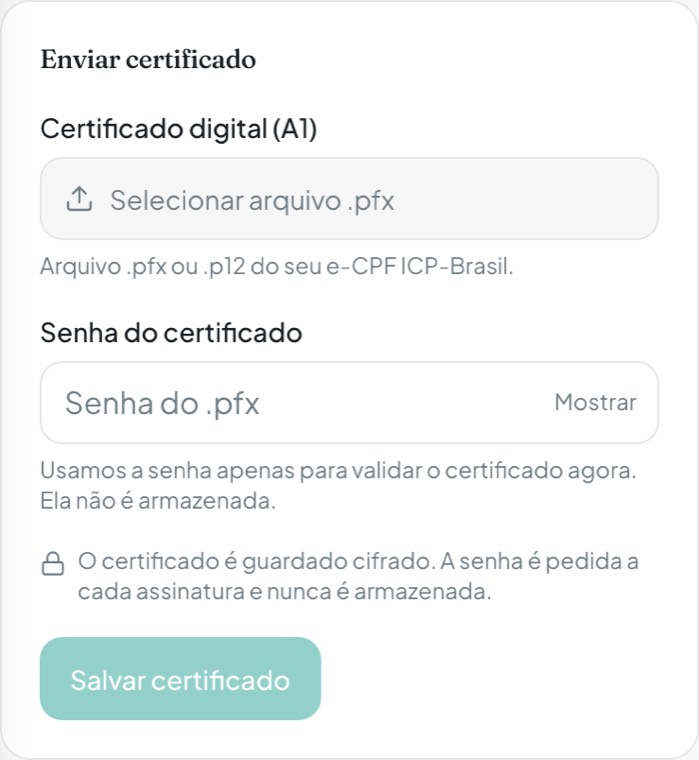
Two security points worth highlighting:
- The certificate is stored encrypted. From then on, for each new signature the app asks for the password only.
- The password is never stored. It is used solely to validate and use the certificate at signing time, then discarded.
You can check the holder and validity at any time, and remove the certificate whenever you want. Today AllEars.Vet accepts A1 (e-CPF ICP-Brasil); A3 (token/card) and cloud certificates are not supported yet.
How to create and sign a prescription
With the certificate set up, the prescription flow is straightforward. When you tap New prescription and choose the patient, you select the prescription type — and each type already loads the correct template and legal requirements:
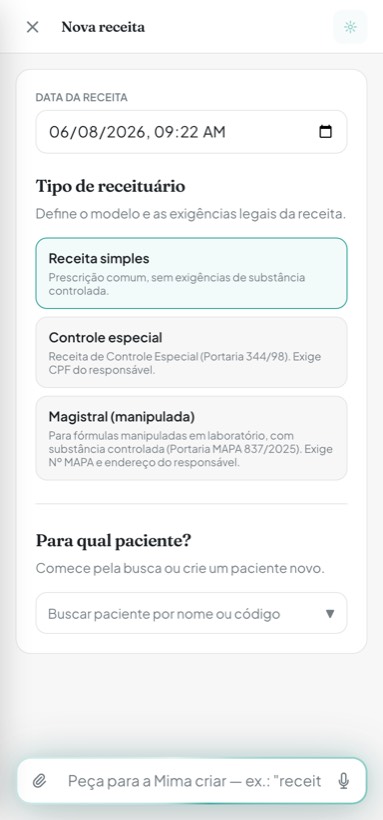
- Simple prescription — a regular prescription, with no controlled-substance requirements.
- Special control — a 2-copy template (Ordinance SVS/MS no. 344/98); requires the owner's CPF.
- Compounded (magistral) — for compounded formulas with controlled substances; requires your MAPA registration number and the owner's address.
The app validates the required data before moving on and lets you fill in anything missing on the spot. With the prescription ready, just tap Sign and type the certificate password. The result is a PDF with the stamp "Digitally signed by … — ICP-Brasil" in place of the manual signature.
And there is a detail designed for the real-world pharmacy: the signed PDF carries a QR Code and a short code that open a public validation page. Even on a printed copy, whoever receives the prescription can scan it, confirm who signed and download the original PDF. Anyone can also validate the file at validar.iti.gov.br, the government's official verifier.
Once signed, the prescription becomes immutable — it cannot be edited or deleted, because any change would break the signature. To change something, you generate a new version.
In short
Digitally signing prescriptions is not new red tape — it is how you keep paper's legal validity, with more security and traceability, in a digital flow. The path is simple: get an A1 ICP-Brasil e-CPF, bought from a CA accredited by ITI, and set it up once in AllEars.Vet. From then on, every prescription comes out signed, verifiable and ready — no paper, no stamp, no rework.

